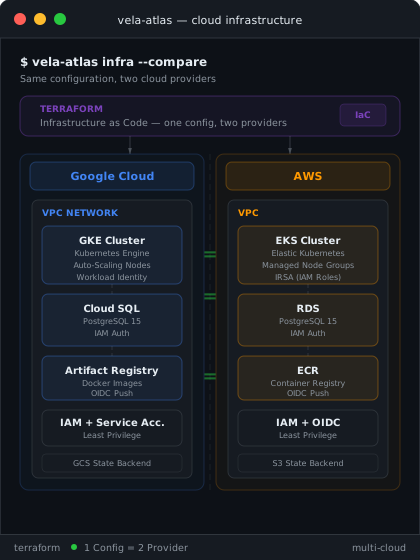
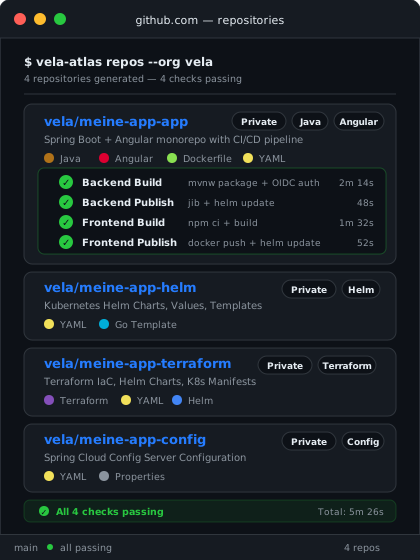
Terraform modules for GCP (GKE, Cloud SQL, Artifact Registry), AWS (EKS, RDS, ECR), Scaleway (Kapsule, Managed PostgreSQL, Container Registry) and STACKIT (SKE, Managed PostgreSQL Flex, Container Registry), VPC, IAM, Workload Identity and object storage state backend, all pre-configured.
What Vela Atlas generates for you.
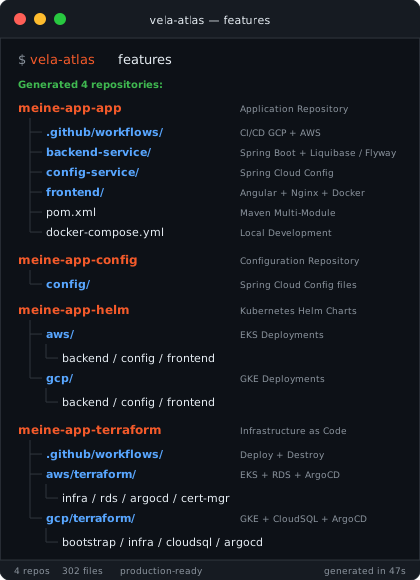
A complete, production-ready software project with cloud infrastructure, CI/CD pipeline, backend, frontend and database, auto-generated in under 60 minutes.
What you get
A complete, production-ready project, auto-created, tested and deployed. Current versions →
Cloud Infrastructure
Terraform for GCP (GKE, Cloud SQL), AWS (EKS, RDS, ECR), Scaleway (Kapsule, Managed PostgreSQL, Container Registry) and STACKIT (SKE, Managed PostgreSQL Flex, Container Registry), VPC, IAM, Workload Identity, fully pre-configured.
CI/CD Pipeline
GitHub Actions with OIDC, Jib build and Docker Buildx, fully automated.
Spring Boot Backend
Spring Boot, Config Server, OpenAPI, production-ready.
Angular or React Frontend
Angular or React, TypeScript, Nginx runtime, modern and fast.
PostgreSQL Database
Cloud SQL or RDS with Liquibase / Flyway migrations and IAM auth.
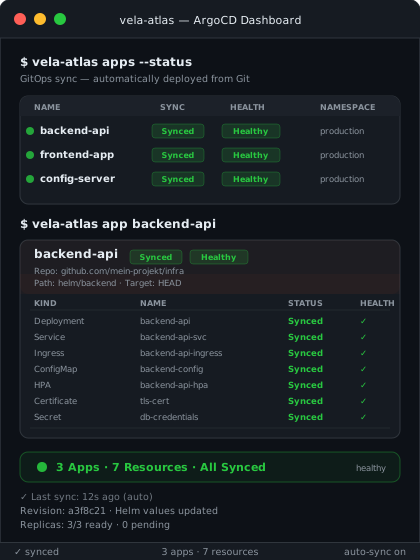
GitOps with Argo CD or Flux
Helm charts, Argo CD or Flux, cert-manager, Let's Encrypt, automated.
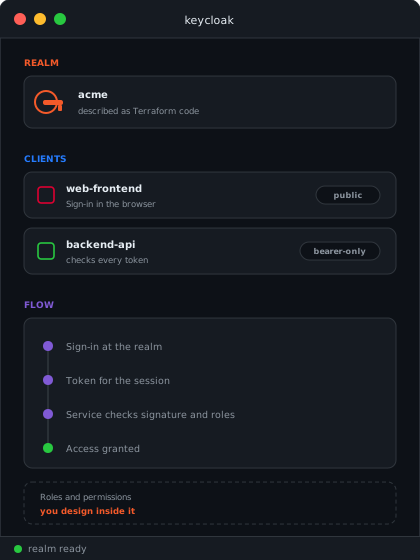
Sign-in with Keycloak
Keycloak in the cluster, realm and clients as code, all services as OAuth2 resource servers, login in the frontend.
AI service
Language models of your cloud connected, pgvector index, MCP server and two example chats to adapt.
Fully configured cloud infrastructure.
Terraform modules for GCP, AWS, Scaleway and STACKIT with tier-based scaling (tiny to high) for every budget.
- GKE or EKS Kubernetes cluster
- Cloud SQL or RDS PostgreSQL with IAM auth
- Artifact Registry or ECR for container images
GitHub Actions, Helm and GitOps.
From git push to production deployment, fully automated with OIDC authentication.
As the GitOps tool you choose Argo CD (default) or Flux, both at no extra cost.
- GitHub Actions with OIDC (no passwords)
- Helm charts per cloud provider and tier
- Argo CD or Flux for GitOps deployments
Authentication that is already set up.
Keycloak runs in the cluster, realm and clients are described as Terraform code and come up the same way in every environment. The backend services validate tokens as OAuth2 resource servers, the frontend ships with the login and the API documentation sits behind it.
- Keycloak in the cluster, realm and clients as Terraform code
- All backend services as OAuth2 resource servers
- Login in the frontend and protected API documentation
- A local environment for development, with no setup of your own
Language models that are already connected.
The AI service is an additional Spring Boot service in your project, built with Spring AI. It talks to the models of your cloud, keeps vector index and conversation history in your PostgreSQL database and exposes its tools as an MCP server. Two examples show how to work with it: an ops agent for questions about cluster and handbook, and a document chat for your own files. Both are starting points, not a finished product: you change, extend or remove them as your project requires.
Models of your cloud
Vertex AI on GCP, Amazon Bedrock on AWS, Generative APIs on Scaleway, AI Model Serving on STACKIT. Access and permissions ship as Terraform code.
pgvector in your database
Vector index and conversation history live in the PostgreSQL database of your project. That is why the AI service requires the database option.
MCP server included
Handbook search, cluster queries and document search are available as MCP tools, for your own agents and development tools.
Spring Boot and Angular or React.
Production-ready microservices with Config Server and a modern frontend, Angular or React as you prefer.
- Spring Boot with OpenAPI and Liquibase / Flyway
- Angular or React with Nginx production build
- Spring Cloud Config Server
Technology Details
Keycloak in the cluster, realm and clients as Terraform code. All backend services validate tokens as OAuth2 resource servers, the frontend ships with the login, and the API documentation sits behind the sign-in. The business roles and permission model stay yours to design.
GKE or EKS with tier-based auto-scaling, NGINX Ingress Controller, cert-manager with Let's Encrypt and Argo CD or Flux for GitOps deployments.
GitHub Actions with OIDC authentication (no password). Separate workflows for backend (Jib) and frontend (Docker Buildx). Automatic image tags and Helm updates.
Helm charts with separate values per cloud provider and tier. Tier-based resource profiles (tiny to high) for CPU, memory and replicas.
Spring Boot with Spring Cloud Config Server, Actuator health checks, SpringDoc OpenAPI and Liquibase / Flyway database migrations. Containerized with Jib.
Angular or React with TypeScript and a multi-stage Docker build (Node.js build + Nginx runtime), PostgreSQL via Cloud SQL (GCP), RDS (AWS), Managed PostgreSQL (Scaleway) or Managed PostgreSQL Flex (STACKIT), with IAM or secret-based authentication.
Spring AI with the models of your cloud (Vertex AI, Amazon Bedrock, Scaleway Generative APIs, STACKIT AI Model Serving), pgvector as the vector index in your PostgreSQL database, an MCP server for the tools, document storage in a bucket of your project. Two example chats in the frontend as a starting point, to change and extend.
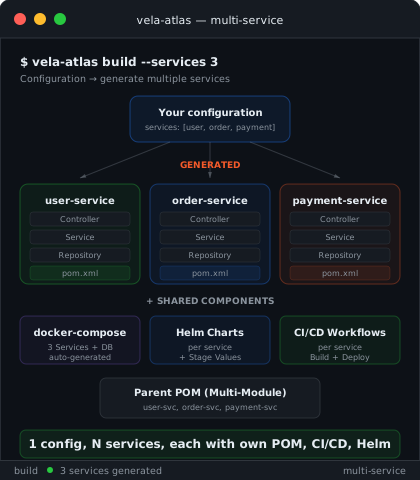
Multiple backend services in one step.
Generate up to 5 microservices per project. Each service gets its own controller, POM, Dockerfile, Helm chart and CI/CD workflow.
- Up to 5 backend services per project
- Docker Compose generated for all services
- Multi-module Maven POM coordinates everything
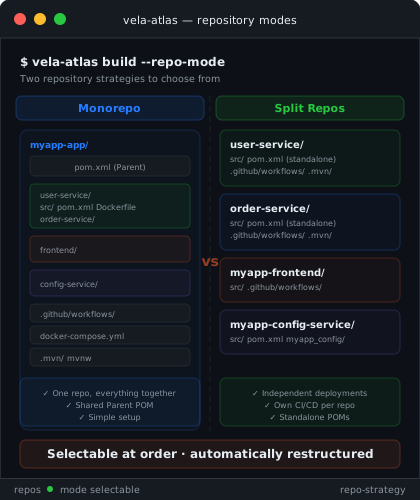
Two repository strategies to choose from.
Monorepo with shared parent POM or split repos with independent repositories per component, including standalone POMs and dedicated CI/CD.
- Monorepo: everything in one repository
- Split repos: independent deployments
- Standalone POMs in split mode
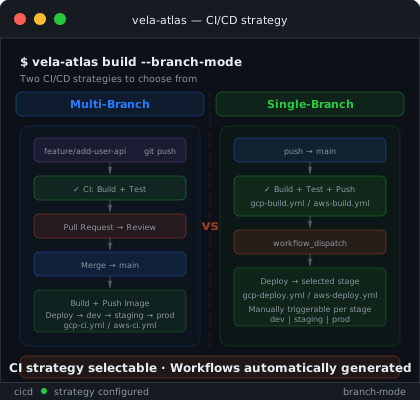
Multi-branch or single-branch.
Multi-branch with feature branches and PR workflow, or single-branch with auto-build and manual deploy per stage.
- Multi-branch: feature → PR → merge → deploy
- Single-branch: auto build, manual deploy
- Workflows generated for GCP, AWS, Scaleway and STACKIT
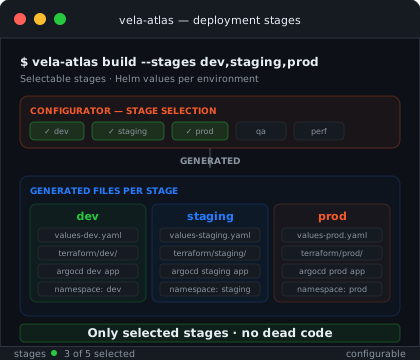
Only the environments you need.
Choose dev, staging, prod or other stages. For each, Helm values, Terraform configs and Argo CD apps or Flux HelmReleases are generated.
- Freely selectable: dev, staging, prod
- Helm values generated per stage
- No dead code, only selected stages
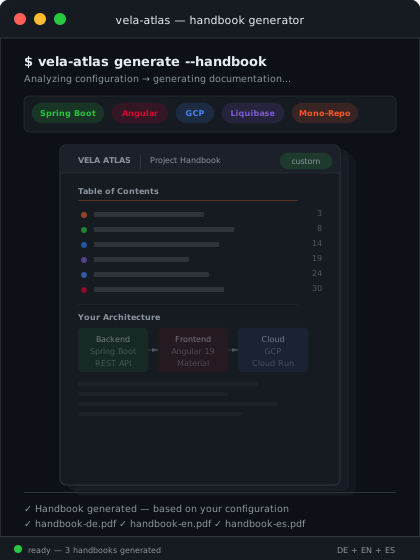
Your project, your documentation.
Every order includes an auto-generated infrastructure handbook as PDF, in terminal dark theme, personalized with your services, cloud settings and credentials. Only the chapters that match your configuration.
- PDF in terminal dark theme, professional and readable
- Language freely selectable: German, English or Spanish
- Chapters depend on configuration (GCP/AWS/Scaleway/STACKIT, Flyway/Liquibase, split/mono)
- Service details, ports, DB schemas, all personalized
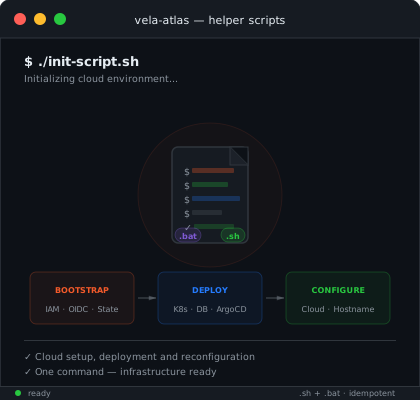
Bootstrap, deploy, reconfigure.
Every generated project includes shell and batch scripts for the most common post-delivery tasks, from one-time cloud bootstrap through full deployment to later changes of cloud credentials or hostname.
- init-script.sh, one-time cloud setup (IAM, OIDC, state backend)
- deploy.sh, complete infrastructure deployment (Kubernetes, DB, Argo CD or Flux)
- update-aws/gcp/scw/stackit-config, change credentials without searching YAML files
- update-hostname, from nip.io to your own domain with one command
- All scripts as .sh + .bat, Linux, macOS and Windows
Ready for your next project?
Configure your software project and save weeks of setup work.
Configure now