

Description
What You Get
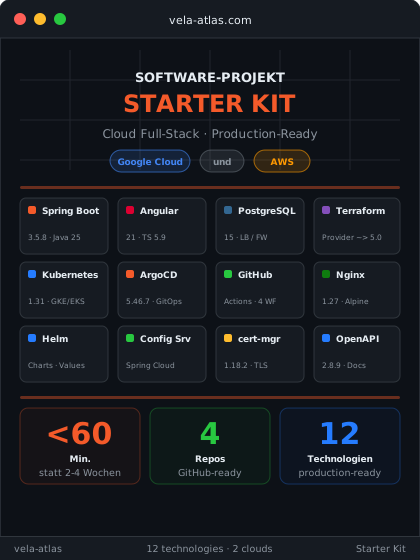
The Software Project Starter Kit generates a complete, production-ready software project for you, fully automated in under 60 minutes. You configure your stack (cloud provider, services, stages, repository mode), purchase the kit and enter your cloud credentials. Our build pipeline handles the rest: finished GitHub repositories, fully configured and deployment-ready.
Repositories, Ready to Use
After generation, you will find coordinated repositories in your GitHub account (four in monorepo mode, one separate repo per component in split mode):
| Repository | Contents |
|---|---|
app |
Spring Boot Backend, Angular or React Frontend, Config Server, Docker Compose, CI/CD Workflows |
terraform |
Infrastructure as Code for GCP, AWS, Scaleway or STACKIT, VPC, Kubernetes cluster, database, container registry, IAM |
helm |
Kubernetes Helm Charts for backend, frontend, Config Server, preconfigured per cloud provider |
config |
Centralized application configuration for Spring Cloud Config Server (dev, staging, production) |
What's Included in the Stack
- Spring Boot Backend: Production-ready microservice with REST API, health checks, Actuator endpoints and SpringDoc OpenAPI documentation. Containerized with Google Jib, no Dockerfile required.
- Angular or React Frontend: Single Page Application with routing and optimized build pipeline, built with Angular or with React and Vite. Served via Nginx with reverse proxy to the backend.
- Spring Cloud Config Server: Centralized configuration management. All services read their configuration from a dedicated config repository, changes without redeployment.
- PostgreSQL Database: Cloud-managed (Cloud SQL or RDS) with Liquibase or Flyway migrations and IAM authentication. No passwords, no secrets in code.
- Terraform Infrastructure: Complete cloud infrastructure as code: VPC/networking, Kubernetes cluster (GKE/EKS), container registry, IAM with Workload Identity/OIDC and state backend (GCS/S3).
- Helm Charts: Kubernetes deployments for all services with Ingress-NGINX, cert-manager for TLS and Cloud SQL Proxy or RDS sidecar for database access.
- CI/CD Pipelines: GitHub Actions workflows for backend, frontend and Terraform. Automatic build, test and push to the container registry on every commit.
- GitOps with Argo CD or Flux CD: Automatic deployment to Kubernetes. Change the Helm chart, push, Argo CD or Flux syncs, no more manual
kubectl apply. Argo CD is the default, Flux CD can be chosen at no extra charge when you order. - Docker Compose: Local development environment with backend, frontend, Config Server and PostgreSQL. One
docker compose upand you're developing locally.
Multi-cloud capable: GCP, AWS, Scaleway and STACKIT
Choose Google Cloud Platform, Amazon Web Services, Scaleway or STACKIT. You configure exactly one cloud per project; the infrastructure is delivered identically for each, same architecture, same security standards, same CI/CD pipelines. Only the cloud-specific services differ:
STACKIT is the sovereign cloud of Schwarz Digits, the IT arm of the Schwarz Group (Lidl, Kaufland), with data centres in Germany and Austria. The delivered setup includes an SKE cluster (STACKIT Kubernetes Engine), a container registry, Managed PostgreSQL Flex and an ingress via a reserved public IP with ingress-nginx. The CI/CD pipeline authenticates with a service account token, and the Terraform state is stored in STACKIT Object Storage.
| Component | GCP | AWS | Scaleway | STACKIT |
|---|---|---|---|---|
| Kubernetes | GKE | EKS | Kapsule | SKE |
| Database | Cloud SQL | RDS | Managed PostgreSQL | Managed PostgreSQL Flex |
| Container registry | Artifact Registry | ECR | Container Registry | Container Registry |
| IAM authentication | Workload Identity | OIDC / IRSA | API key | Service account token |
Modular Design
Not every project needs everything. Choose what you need when placing your order:
- Database: PostgreSQL with Liquibase or Flyway migrations and IAM login. Without this option, you get a stateless service with no database dependency.
- Config Server: Centralized configuration via Spring Cloud Config. Without this option, each service reads its configuration locally from
application.yaml. - Frontend: Complete frontend with Angular or React and Nginx proxy. Without this option, you get a backend-only project.
- Authentication: Keycloak in the cluster, realm and clients as Terraform code, all services as OAuth2 resource servers and login in the frontend. The business roles and permission model stay yours to design. Without this option, you get the project without a sign-in.
- GitOps tool: Argo CD (default) or Flux CD, both at no extra charge and with the same Helm charts. The Flux web UI opens in the browser: with the authentication option via Keycloak login, without it with no sign-in, so you secure access yourself.
- Multiple Backend Services: Generate up to 5 microservices per project. Each service gets its own controller, POM, Dockerfile, Helm chart and CI/CD workflow.
- Deployment Stages: Choose exactly the environments you need (dev, staging, prod). For each stage, Helm values, Terraform configurations and the GitOps deployment with Argo CD or Flux CD are generated.
The generated files (Docker Compose, Maven modules, Helm charts, CI/CD workflows) automatically adapt to your selection, no dead dependencies, no dead code.
Repository Mode
Choose the repository strategy that fits your team:
- Monorepo: All services, frontend and Config Server in one repository with a shared parent POM. Ideal for small teams and fast iterations.
- Split Repos: Each component gets its own repository with a standalone POM, its own Maven Wrapper and its own CI/CD workflows. Ideal for larger teams with independent deployment cycles.
CI/CD Strategy
Two branching models are available:
- Multi-Branch: Feature branch → Pull Request → Merge → automatic build and deployment to all stages. One workflow for everything (
gcp-ci.yml/aws-ci.yml). - Single-Branch: Push to main automatically triggers build + push. Deployment to individual stages is triggered separately via
workflow_dispatch, full control over the rollout.
Included Helper Scripts
Every generated project includes shell and batch scripts for the most common post-delivery tasks:
- Cloud Bootstrap:
init-script.shsets up your cloud account once: IAM roles, OIDC federation, Terraform state backend, service accounts and secret manager. One command, all prerequisites fulfilled. - Infrastructure Deployment:
deploy.shruns the complete Terraform deployment: Kubernetes cluster, database, ingress controller, Argo CD or Flux CD, DB initialization and Helm values, with retry logic and stage-specific hostnames. - Change Cloud Configuration:
update-aws-config.shandupdate-gcp-config.shupdate account ID, region and registry URLs across all repositories at once. No manual searching through YAML files. - Switch Hostname:
update-hostname.shswitches between IP-based nip.io address (development) and custom domain (production), one command for all repositories.
All scripts are idempotent (safe to re-run) and available as .sh + .bat, for Linux, macOS and Windows.
Current Versions
Backend
| Component | Version | Details |
|---|---|---|
| Spring Boot | 4.1.1 | Spring Framework 7.x |
| Java | 25 | Eclipse Temurin 25-jre |
| Spring Cloud | 2025.1.3 | Config Server, Gateway |
| Spring Cloud GCP | 8.2.1 | GCP integration |
| SpringDoc OpenAPI | 3.1.1 | API documentation |
| Lombok | 1.18.48 | Code generation |
| AWS SDK | 2.54.17 | AWS integration |
| Jib Maven Plugin | 3.5.2 | Container build without Docker |
Frontend
| Component | Version | Details |
|---|---|---|
| Angular | 21.0.0 | Standalone components |
| Angular CLI | 21.0.4 | Build tooling |
| RxJS | 7.8.2 | Reactive extensions |
| React | 19.3.0 | Alternative to Angular, same application |
| Vite | 8.3.0 | Build tooling for React |
| Vite Plugin React | 6.1.1 | React integration for Vite |
| TypeScript | 5.9.2 | Type system |
| Node.js | 22 | Build runtime |
| Nginx | 1.31.5-alpine | Production runtime |
Authentication
| Component | Version | Details |
|---|---|---|
| Keycloak | 26.7.3 | Identity provider in the cluster |
| keycloak-js | 26.2.4 | Login library in the frontend |
| keycloakx Chart | 7.3.1 | Keycloak deployment in the cluster |
| Keycloak Provider | ~> 5.9 | Realm and clients as Terraform code |
Database
| Component | Version | Details |
|---|---|---|
| PostgreSQL | 15 | Cloud SQL (GCP) / RDS (AWS) / Managed PostgreSQL (Scaleway) / Managed PostgreSQL Flex (STACKIT) |
| Liquibase | Spring Boot BOM | Schema migrations (YAML changelogs) |
| Flyway | Spring Boot BOM | Schema migrations (SQL-based) |
Infrastructure & Terraform
| Component | Version | Details |
|---|---|---|
| AWS Provider | ~> 5.0 | EKS, RDS, ECR, IAM |
| Google Provider | ~> 5.0 | GKE, Cloud SQL, Artifact Registry |
| Scaleway Provider | ~> 2.83 | Kapsule, Managed PostgreSQL, Container Registry |
| STACKIT Provider | ~> 0.115.0 | SKE, Managed PostgreSQL Flex, Container Registry |
| Kubernetes Provider | ~> 2.29 | K8s resources |
| Helm Provider | ~> 3.3 | Helm releases |
| TLS Provider | ~> 4.4 | Certificates |
Kubernetes & Deployment
| Component | Version | Details |
|---|---|---|
| Kubernetes (EKS) | 1.34 | Default version |
| Argo CD Chart | 5.46.7 | GitOps deployments |
| Flux | 2.9.5 | GitOps deployments, alternative to Argo CD |
| Flux Operator Chart | 0.60.0 | Installs Flux (flux-operator, flux-instance) |
| Ingress-NGINX Chart | 4.15.1 | Load balancer |
| cert-manager | 1.21.2 | Let’s Encrypt TLS |
CI/CD & Build
| Component | Version | Details |
|---|---|---|
| GitHub Actions | OIDC | No passwords needed |
| Jib | 3.5.2 | Backend container build |
| Docker Buildx | Latest | Frontend container build |
| Maven Compiler | 3.16.0 | Java compilation |
| Maven Surefire | Spring Boot BOM | Test runner |
How It Works
- Configure: Choose your cloud provider (GCP, AWS, Scaleway or STACKIT), optional components (database, Config Server, frontend), GitOps tool, repository structure and branching strategy (multi-branch or single-branch).
- Order & Pay: The price is calculated based on your selection.
- Enter Project Details: After purchase, you receive a form for your project settings (app name, repository owner). You can optionally provide cloud credentials and a GitHub token, then repositories and CI/CD secrets are automatically set up for you. Without these details, you receive the finished project as a download, you then enter secrets and project IDs yourself in the generated configuration files.
- Automatic Generation: Our build pipeline creates your project. If desired, the GitHub repositories are created and CI/CD secrets are configured.
- Get Started: You receive an email with a download link and can start developing immediately.
Why It's Worth It
An experienced DevOps engineer typically needs 2 to 4 weeks to manually set up comparable infrastructure. That quickly adds up to costs of 30,000+ EUR: per project, starting from scratch every time.
The result is rarely consistent: missing health checks, hardcoded secrets, no IAM integration, CI/CD pipelines without OIDC, typical shortcuts under time pressure. With the Software Project Starter Kit, you get an architecture in under 60 minutes that avoids these mistakes from the start: OIDC instead of passwords, IAM authentication instead of database secrets, GitOps instead of manual deployment. Automated, reproducible and production-ready from day one.
Cost Comparison
| Manual | With Vela Atlas | |
|---|---|---|
| Time Required | 2 to 4 weeks | under 60 minutes |
| Cost | 30,000+ EUR | One-time purchase price |
| Result | Error-prone, different every time | 4 repos (App, Terraform, Helm, Config), best practices |
| Security | Secrets in code, passwords in CI/CD | OIDC, IAM, no secrets in code |
| Multi-Cloud | Second setup required | GCP, AWS, Scaleway and STACKIT |
| Repeatability | Every project from scratch | Identical quality, every time |